はじめに
Virtual WAN のハブには Azure Firewall または対応している仮想アプライアンスを配置できます。
ですが、「Virtual WAN の Azure Firewall や仮想アプライアンスでは使えない機能がある」や「仮想アプライアンスを自分たちで可能な限り管理したい」というような要件がある場合には、スポーク仮想ネットワークに IaaS で自前の仮想アプライアンスを置きたくなることもあるでしょう。そんな構成をやってみましたというエントリーです。
参考: シナリオ:NVA を経由するトラフィックのルーティング
なお本エントリーは Virtual WAN のルーティングと向き合うシリーズ第六弾です。今までのエントリはこちら。
- Virtual WAN のルーティングと向き合う(基本的な動作とルーティングの優先順位編)
- Virtual WAN のルーティングと向き合う(ルートテーブル編)
- Virtual WAN のルーティングと向き合う(ラベル編)
- Virtual WAN のルーティングと向き合う(ExpressRoute のトランジット接続)
- Virtual WAN のルーティングと向き合う(ルートマップによる経路フィルタリング)
構成例
今回試す構成は次の通りです。
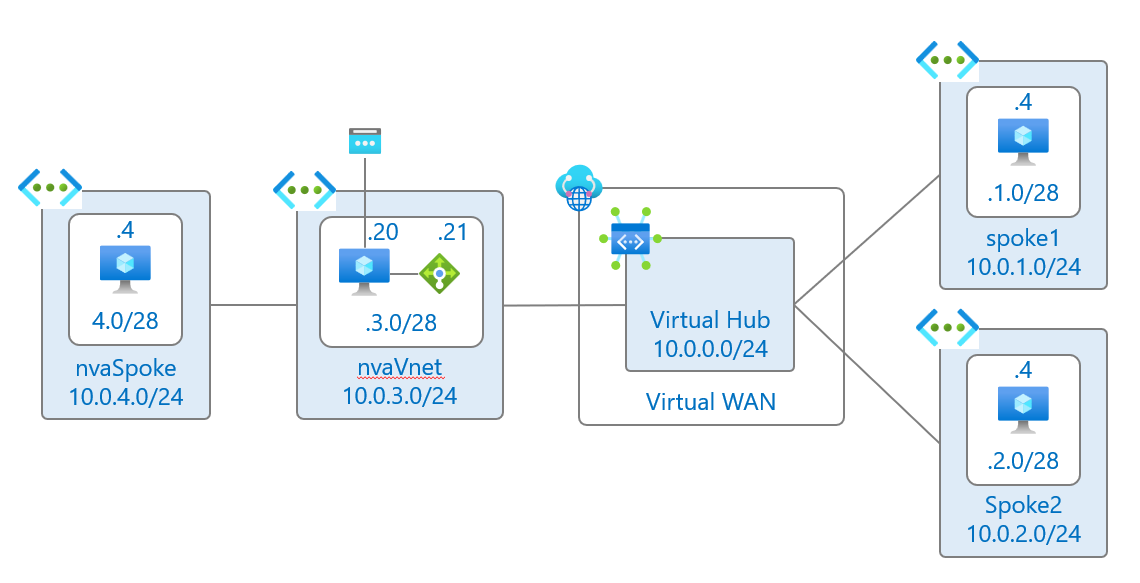
右側のスポーク仮想ネットワークから nvaVnet に設置されている仮想アプライアンス経由でインターネットにアクセスできるようにします。また、右側のスポークから nvaVnet に設置されれている仮想アプライアンス経由で左側の nvaSpoke 上の仮想マシンにアクセスできるようにします。
設定
仮想アプライアンスが存在する仮想ネットワークと Virtual Hub 間の仮想ネットワーク接続に、スタティックルートと再配信の設定を追加します。スタティックルートでは、デフォルトルートと nvaSpoke 仮想ネットワーク用のルーティングのネクストホップを、NVA 用仮想マシンに紐づく内部スタンダードバランサーの ロントエンド IP アドレスに指定します。
resource vhubNva 'Microsoft.Network/virtualHubs/hubVirtualNetworkConnections@2025-01-01' = {
  name: 'vhub-to-nva'
  parent: vhub
  properties: {
    remoteVirtualNetwork: {
      id: nvavnet.id
    }
    enableInternetSecurity: false
    allowRemoteVnetToUseHubVnetGateways: true
    allowHubToRemoteVnetTransit: true
    routingConfiguration: {
      // nvaVnet に送信するスタティックルートの設定
      vnetRoutes: {
        staticRoutes: [
          {
            name: 'default'
            addressPrefixes: [
              '0.0.0.0/0'
            ]
            nextHopIpAddress: '10.0.3.21'
          }
          {
            name: 'nvaSpoke'
            addressPrefixes: [
              '10.0.4.0/24'
            ]
            nextHopIpAddress: '10.0.3.21'
          }
        ]
      }
      // 上記のルーティングを再配送したい仮想ハブのルーティングテーブルを指定
      propagatedRouteTables: {
        ids: [
          {
            id: resourceId('Microsoft.Network/virtualHubs/hubRouteTables', vhub.name, 'DefaultRouteTable')
          }
        ]
      }
    }
  }
}
また、デフォルトルートを受け取りたいスポーク VNET との仮想ネットワーク接続では、デフォルトルートを受け取る設定(enableInternetSecurity)を有効にする必要があります。この設定がないと、Virtual Hub が再配送するデフォルトルートがスポーク仮想ネットワークに挿入されません
resource vhubSpoke1 'Microsoft.Network/virtualHubs/hubVirtualNetworkConnections@2025-01-01' = {
  name: 'vhub-to-spoke1'
  parent: vhub
  properties: {
    remoteVirtualNetwork: {
      id: spoke1.id
    }
    // 仮想ハブからデフォルトルートを受け取る設定
    enableInternetSecurity: true
    allowRemoteVnetToUseHubVnetGateways: true
    allowHubToRemoteVnetTransit: true
    routingConfiguration: {}
  }
}
あとは、nvaSpokeVet 上のサーバからの通信が仮想アプライアンスに向かうように、サブネットに以下のユーザ定義ルートを設定します。
resource nvaSpokeRt 'Microsoft.Network/routeTables@2025-01-01' = {
  name: 'nvaSpokeRouteTable'
  location: location
  properties: {
    routes: [
      {
        name: 'toNva'
        properties: {
          addressPrefix: '0.0.0.0/0'
          nextHopType: 'VirtualAppliance'
          nextHopIpAddress: '10.0.3.21'
        }
      }
    ]
  }
}
その他細かい設定は以下の Bicep テンプレートを参照ください。
Bicepテンプレート
param location string = resourceGroup().location
param adminUser string
param adminPassword string

resource vwan 'Microsoft.Network/virtualWans@2025-01-01' = {
  name: 'myVwan'
  location: location
  properties: {
    allowBranchToBranchTraffic: true
    allowVnetToVnetTraffic: true
    disableVpnEncryption: false
    type: 'Standard'
  }
}

resource vhub 'Microsoft.Network/virtualHubs@2025-01-01' = {
  name: 'myVHub'
  location: location
  properties: {
    virtualWan: {
      id: vwan.id
    }
    addressPrefix: '10.0.0.0/24'
    allowBranchToBranchTraffic: true
  }
}

resource spoke1 'Microsoft.Network/virtualNetworks@2025-01-01' = {
  name: 'spokeVNet1'
  location: location
  properties: {
    addressSpace: {
      addressPrefixes: [
        '10.0.1.0/24'
      ]
    }
    subnets: [
      {
        name: 'default'
        properties: {
          addressPrefix: '10.0.1.0/28'
          defaultOutboundAccess: false
        }
      }
      {
        name: 'AzureBastionSubnet'
        properties: {
          addressPrefix: '10.0.1.128/25'
        }
      }
    ]
  }
}

resource spoke1Bastion 'Microsoft.Network/bastionHosts@2025-01-01' = {
  name: 'spoke1Bastion'
  location: location
  sku: {
    name: 'Developer'
  }
  properties: {
    virtualNetwork: {
      id: spoke1.id
    }
  }
}

resource spoke2 'Microsoft.Network/virtualNetworks@2025-01-01' = {
  name: 'spokeVNet2'
  location: location
  properties: {
    addressSpace: {
      addressPrefixes: [
        '10.0.2.0/24'
      ]
    }
    subnets: [
      {
        name: 'default'
        properties: {
          addressPrefix: '10.0.2.0/28'
          defaultOutboundAccess: false
        }
      }
      {
        name: 'AzureBastionSubnet'
        properties: {
          addressPrefix: '10.0.2.128/25'
        }
      }
    ]
  }
}

resource spoke2Bastion 'Microsoft.Network/bastionHosts@2025-01-01' = {
  name: 'spoke2Bastion'
  location: location
  sku: {
    name: 'Developer'
  }
  properties: {
    virtualNetwork: {
      id: spoke2.id
    }
  }
}

resource nvaNsg 'Microsoft.Network/networkSecurityGroups@2025-01-01' = {
  name: 'nvaNSG'
  location: location
  properties: {
    securityRules: [
      {
        name: 'Allow-Internet-All'
        properties: {
          priority: 100
          direction: 'Inbound'
          access: 'Allow'
          protocol: 'Tcp'
          destinationPortRanges: [
            '80'
            '443'
          ]
          sourcePortRange: '*'
          sourceAddressPrefix: '*'
          destinationAddressPrefix: 'Internet'
        }
      }
    ]
  }
}

resource nvavnet 'Microsoft.Network/virtualNetworks@2025-01-01' = {
  name: 'nvaVNet'
  location: location
  properties: {
    addressSpace: {
      addressPrefixes: [
        '10.0.3.0/24'
      ]
    }
    subnets: [
      {
        name: 'external'
        properties: {
          addressPrefix: '10.0.3.0/28'
        }
      }
      {
        name: 'internal'
        properties: {
          addressPrefix: '10.0.3.16/28'
          defaultOutboundAccess: false
          networkSecurityGroup: {
            id: nvaNsg.id
          }
        }
      }
      {
        name: 'AzureBastionSubnet'
        properties: {
          addressPrefix: '10.0.3.128/25'
        }
      }
    ]
  }
}

resource nvaBastion 'Microsoft.Network/bastionHosts@2025-01-01' = {
  name: 'nvaBastion'
  location: location
  sku: {
    name: 'Developer'
  }
  properties: {
    virtualNetwork: {
      id: nvavnet.id
    }
  }
}

resource nvaspoke 'Microsoft.Network/virtualNetworks@2025-01-01' = {
  name: 'nvaSpokeVNet'
  location: location
  properties: {
    addressSpace: {
      addressPrefixes: [
        '10.0.4.0/24'
      ]
    }
    subnets: [
      {
        name: 'default'
        properties: {
          addressPrefix: '10.0.4.0/28'
          defaultOutboundAccess: false
          routeTable: {
            id: nvaSpokeRt.id
          }
        }
      }
    ]
  }
}

resource nvaSpokeRt 'Microsoft.Network/routeTables@2025-01-01' = {
  name: 'nvaSpokeRouteTable'
  location: location
  properties: {
    routes: [
      {
        name: 'toNva'
        properties: {
          addressPrefix: '0.0.0.0/0'
          nextHopType: 'VirtualAppliance'
          nextHopIpAddress: '10.0.3.21'
        }
      }
    ]
  }
}

resource peering1 'Microsoft.Network/virtualNetworks/virtualNetworkPeerings@2025-01-01' = {
  name: 'nva-to-nvaspoke'
  parent: nvavnet
  properties: {
    remoteVirtualNetwork: {
      id: nvaspoke.id
    }
    allowVirtualNetworkAccess: true
    allowForwardedTraffic: true
    allowGatewayTransit: false
    useRemoteGateways: false
  }
}

resource peering2 'Microsoft.Network/virtualNetworks/virtualNetworkPeerings@2025-01-01' = {
  name: 'nvaspoke-to-nva'
  parent: nvaspoke
  properties: {
    remoteVirtualNetwork: {
      id: nvavnet.id
    }
    allowVirtualNetworkAccess: true
    allowForwardedTraffic: true
    allowGatewayTransit: false
    useRemoteGateways: false
  }
}

resource vhubSpoke1 'Microsoft.Network/virtualHubs/hubVirtualNetworkConnections@2025-01-01' = {
  name: 'vhub-to-spoke1'
  parent: vhub
  properties: {
    remoteVirtualNetwork: {
      id: spoke1.id
    }
    enableInternetSecurity: true // デフォルトルートが広報される
    allowRemoteVnetToUseHubVnetGateways: true
    allowHubToRemoteVnetTransit: true
    routingConfiguration: {
      propagatedRouteTables: {
        labels: [
          'default'
        ]
        ids: [
          {
            id: resourceId('Microsoft.Network/virtualHubs/hubRouteTables', vhub.name, 'defaultRouteTable')
          }
        ]
      }
    }
  }
}

resource vhubSpoke2 'Microsoft.Network/virtualHubs/hubVirtualNetworkConnections@2025-01-01' = {
  name: 'vhub-to-spoke2'
  parent: vhub
  properties: {
    remoteVirtualNetwork: {
      id: spoke2.id
    }
    enableInternetSecurity: true
    allowRemoteVnetToUseHubVnetGateways: true
    allowHubToRemoteVnetTransit: true
    routingConfiguration: {
      propagatedRouteTables: {
        labels: [
          'default'
        ]
        ids: [
          {
            id: resourceId('Microsoft.Network/virtualHubs/hubRouteTables', vhub.name, 'defaultRouteTable')
          }
        ]
      }
    }
  }
}

resource vhubNva 'Microsoft.Network/virtualHubs/hubVirtualNetworkConnections@2025-01-01' = {
  name: 'vhub-to-nva'
  parent: vhub
  properties: {
    remoteVirtualNetwork: {
      id: nvavnet.id
    }
    enableInternetSecurity: false
    allowRemoteVnetToUseHubVnetGateways: true
    allowHubToRemoteVnetTransit: true
    routingConfiguration: {
      vnetRoutes: {
        staticRoutes: [
          {
            name: 'default'
            addressPrefixes: [
              '0.0.0.0/0'
            ]
            nextHopIpAddress: '10.0.3.21'
          }
          {
            name: 'nvaSpoke'
            addressPrefixes: [
              '10.0.4.0/24'
            ]
            nextHopIpAddress: '10.0.3.21'
          }
        ]
      }
      propagatedRouteTables: {
        labels: [
          'default'
        ]
        ids: [
          {
            id: resourceId('Microsoft.Network/virtualHubs/hubRouteTables', vhub.name, 'defaultRouteTable')
          }
        ]
      }
    }
  }
}

resource spoke1VmNic 'Microsoft.Network/networkInterfaces@2025-01-01' = {
  location: location
  name: 'spoke1vm-nic'
  properties: {
    ipConfigurations: [
      {
        name: 'ipconfig1'
        properties: {
          subnet: {
            id: '${spoke1.id}/subnets/default'
          }
          privateIPAllocationMethod: 'Static'
          privateIPAddress: '10.0.1.4'
        }
      }
    ]
  }
}

resource spoke1Vm 'Microsoft.Compute/virtualMachines@2025-04-01' = {
  location: location
  name: 'spoke1vm'
  properties: {
    diagnosticsProfile: {
      bootDiagnostics: {
        enabled: true
      }
    }
    hardwareProfile: {
      vmSize: 'Standard_B1ms'
    }
    osProfile: {
      adminUsername: adminUser
      adminPassword: adminPassword
      computerName: 'spoke1vm'
      linuxConfiguration: {
        disablePasswordAuthentication: false
      }
    }
    storageProfile: {
      imageReference: {
        offer: 'ubuntu-24_04-lts'
        publisher: 'Canonical'
        sku: 'server'
        version: 'latest'
      }
      osDisk: {
        createOption: 'FromImage'
        osType: 'Linux'
        name: 'spoke1osdisk'
        managedDisk: {
          storageAccountType: 'StandardSSD_LRS'
        }
      }
    }
    networkProfile: {
      networkInterfaces: [
        {
          id: spoke1VmNic.id
        }
      ]
    }
  }
}

resource spoke2VmNic 'Microsoft.Network/networkInterfaces@2025-01-01' = {
  location: location
  name: 'spoke2vm-nic'
  properties: {
    ipConfigurations: [
      {
        name: 'ipconfig1'
        properties: {
          subnet: {
            id: '${spoke2.id}/subnets/default'
          }
          privateIPAllocationMethod: 'Static'
          privateIPAddress: '10.0.2.4'
        }
      }
    ]
  }
}

resource spoke2Vm 'Microsoft.Compute/virtualMachines@2025-04-01' = {
  location: location
  name: 'spoke2vm'
  properties: {
    diagnosticsProfile: {
      bootDiagnostics: {
        enabled: true
      }
    }
    hardwareProfile: {
      vmSize: 'Standard_B1ms'
    }
    osProfile: {
      adminUsername: adminUser
      adminPassword: adminPassword
      computerName: 'spoke2vm'
      linuxConfiguration: {
        disablePasswordAuthentication: false
      }
    }
    storageProfile: {
      imageReference: {
        offer: 'ubuntu-24_04-lts'
        publisher: 'Canonical'
        sku: 'server'
        version: 'latest'
      }
      osDisk: {
        createOption: 'FromImage'
        osType: 'Linux'
        name: 'spoke2osdisk'
        managedDisk: {
          storageAccountType: 'StandardSSD_LRS'
        }
      }
    }
    networkProfile: {
      networkInterfaces: [
        {
          id: spoke2VmNic.id
        }
      ]
    }
  }
}

resource nvaVmPublicIp 'Microsoft.Network/publicIPAddresses@2025-01-01' = {
  location: location
  name: 'nvaVmPublicIp'
  sku: {
    name: 'Standard'
    tier: 'Regional'
  }
  properties: {
    publicIPAllocationMethod: 'Static'
    publicIPAddressVersion: 'IPv4'
  }
}

resource nvaVmNicInternal 'Microsoft.Network/networkInterfaces@2025-01-01' = {
  location: location
  name: 'nvaVmNicInternal'
  properties: {
    ipConfigurations: [
      {
        name: 'ipconfig1'
        properties: {
          subnet: {
            id: '${nvavnet.id}/subnets/internal'
          }
          privateIPAllocationMethod: 'Static'
          privateIPAddress: '10.0.3.20'
          loadBalancerBackendAddressPools: [
            {
              id: nvaLb.properties.backendAddressPools[0].id
            }
          ]
          publicIPAddress: {
            id: nvaVmPublicIp.id
          }
        }
      }
    ]
    enableIPForwarding: true
  }
}

/*
  iptables -t nat -A POSTROUTING -s 10.0.1.0/24 -j MASQUERADE
  iptables -t nat -A POSTROUTING -s 10.0.2.0/24 -j MASQUERADE
  sudo sysctl -w net.ipv4.ip_forward=1
*/

resource nvaVm 'Microsoft.Compute/virtualMachines@2025-04-01' = {
  location: location
  name: 'nvaVm'
  properties: {
    diagnosticsProfile: {
      bootDiagnostics: {
        enabled: true
      }
    }
    hardwareProfile: {
      vmSize: 'Standard_B2ms'
    }
    osProfile: {
      adminUsername: adminUser
      adminPassword: adminPassword
      computerName: 'nvaVm'
      linuxConfiguration: {
        disablePasswordAuthentication: false
      }
    }
    storageProfile: {
      imageReference: {
        offer: 'ubuntu-24_04-lts'
        publisher: 'Canonical'
        sku: 'server'
        version: 'latest'
      }
      osDisk: {
        createOption: 'FromImage'
        osType: 'Linux'
        name: 'nvaOsDisk'
        managedDisk: {
          storageAccountType: 'StandardSSD_LRS'
        }
      }
    }
    networkProfile: {
      networkInterfaces: [
        {
          id: nvaVmNicInternal.id
          properties: {
            primary: true
          }
        }
      ]
    }
  }
}

resource nvaLb 'Microsoft.Network/loadBalancers@2025-01-01' = {
  location: location
  name: 'nvaLb'
  sku: {
    name: 'Standard'
    tier: 'Regional'
  }
  properties: {
    frontendIPConfigurations: [
      {
        name: 'LoadBalancerFrontEnd'
        properties: {
          subnet: {
            id: '${nvavnet.id}/subnets/internal'
          }
          privateIPAddress: '10.0.3.21'
          privateIPAllocationMethod: 'Static'
        }
      }
    ]
    backendAddressPools: [
      {
        name: 'nvaBackendPool'
      }
    ]
    probes: [
      {
        name: 'nvaHealthProbe'
        properties: {
          protocol: 'Tcp'
          port: 22
          intervalInSeconds: 15
          numberOfProbes: 4
        }
      }
    ]
    loadBalancingRules: [
      {
        name: 'ha'
        properties: {
          protocol: 'All'
          frontendPort: 0
          backendPort: 0
          backendAddressPool: {
            id: resourceId('Microsoft.Network/loadBalancers/backendAddressPools', 'nvaLb', 'nvaBackendPool')
          }
          frontendIPConfiguration: {
            id: resourceId('Microsoft.Network/loadBalancers/frontendIPConfigurations', 'nvaLb', 'LoadBalancerFrontEnd')
          }
          probe: {
            id: resourceId('Microsoft.Network/loadBalancers/probes', 'nvaLb', 'nvaHealthProbe')
          }
        }
      }
    ]
  }
}

resource nvaspokeVmNic 'Microsoft.Network/networkInterfaces@2025-01-01' = {
  location: location
  name: 'nvaSpokeVm-nic'
  properties: {
    ipConfigurations: [
      {
        name: 'ipconfig1'
        properties: {
          subnet: {
            id: '${nvaspoke.id}/subnets/default'
          }
          privateIPAllocationMethod: 'Static'
          privateIPAddress: '10.0.4.4'
        }
      }
    ]
  }
}

resource nvaspokeVm 'Microsoft.Compute/virtualMachines@2025-04-01' = {
  location: location
  name: 'nvaSpokeVm'
  properties: {
    diagnosticsProfile: {
      bootDiagnostics: {
        enabled: true
      }
    }
    hardwareProfile: {
      vmSize: 'Standard_B1ms'
    }
    osProfile: {
      adminUsername: adminUser
      adminPassword: adminPassword
      computerName: 'nvaSpokeVm'
      linuxConfiguration: {
        disablePasswordAuthentication: false
      }
    }
    storageProfile: {
      imageReference: {
        offer: 'ubuntu-24_04-lts'
        publisher: 'Canonical'
        sku: 'server'
        version: 'latest'
      }
      osDisk: {
        createOption: 'FromImage'
        osType: 'Linux'
        name: 'nvaSpokeOsDisk'
        managedDisk: {
          storageAccountType: 'StandardSSD_LRS'
        }
      }
    }
    networkProfile: {
      networkInterfaces: [
        {
          id: nvaspokeVmNic.id
        }
      ]
    }
  }
}

resource nvaspokeVmruncommand 'Microsoft.Compute/virtualMachines/runCommands@2025-04-01' = {
  parent: nvaspokeVm
  location: location
  name: 'enableIPForwarding'
  properties: {
    source: {
      script: '''
        sysctl -w net.ipv4.ip_forward=1
        iptables -t nat -A POSTROUTING -s 10.0.0.0/16 -d 10.0.0.0/8 -j RETURN
        iptables -t nat -A POSTROUTING -s 10.0.0.0/16 -d 172.16.0.0/12 -j RETURN
        iptables -t nat -A POSTROUTING -s 10.0.0.0/16 -d 192.168.0.0/16 -j RETURN
        iptables -t nat -A POSTROUTING -s 10.0.0.0/16 -d 127.0.0.0/8 -j RETURN
        iptables -t nat -A POSTROUTING -s 10.0.0.0/16 -j MASQUERADE
      '''
    }
    parameters: []
  }
}
動作確認
では動作確認しましょう。
仮想ハブのデフォルトルートテーブルには、仮想ネットワーク接続で設定したルーティング(0.0.0.0/0 と 10.0.4.0/24)が再配信されています。仮想ハブのルートテーブルのネクストホップは IP アドレスではなく接続になりますので、仮想アプライアンスが存在している仮想ネットワークとの接続がネクストホップになっているのがわかります。
$res = Get-AzVHubEffectiveRoute -ResourceId /subscriptions/MY-SUB-ID/resourceGroups/vwantest1204/providers/Microsoft.Network/virtualHubs/myVHub/hubRouteTables/defaultRouteTable -ResourceGroupName vwantest1204 -VirtualHubName myVhub -VirtualWanResourceType RouteTable
$res.Value

AddressPrefixes : {10.0.3.0/24}
NextHops        : {/subscriptions/MY-SUB-ID/resourceGroups/vwantest1204/providers/Microsoft.Network/virtualHubs/myVHub/hubVirtualNetworkConnections/vhub-to-nva}
NextHopType     : Virtual Network Connection
AsPath          :
RouteOrigin     : /subscriptions/MY-SUB-ID/resourceGroups/vwantest1204/providers/Microsoft.Network/virtualHubs/myVHub/hubVirtualNetworkConnections/vhub-to-nva

AddressPrefixes : {10.0.1.0/24}
NextHops        : {/subscriptions/MY-SUB-ID/resourceGroups/vwantest1204/providers/Microsoft.Network/virtualHubs/myVHub/hubVirtualNetworkConnections/vhub-to-spoke1}
NextHopType     : Virtual Network Connection
AsPath          :
RouteOrigin     : /subscriptions/MY-SUB-ID/resourceGroups/vwantest1204/providers/Microsoft.Network/virtualHubs/myVHub/hubVirtualNetworkConnections/vhub-to-spoke1

AddressPrefixes : {10.0.2.0/24}
NextHops        : {/subscriptions/MY-SUB-ID/resourceGroups/vwantest1204/providers/Microsoft.Network/virtualHubs/myVHub/hubVirtualNetworkConnections/vhub-to-spoke2}
NextHopType     : Virtual Network Connection
AsPath          :
RouteOrigin     : /subscriptions/MY-SUB-ID/resourceGroups/vwantest1204/providers/Microsoft.Network/virtualHubs/myVHub/hubVirtualNetworkConnections/vhub-to-spoke2

AddressPrefixes : {0.0.0.0/0}
NextHops        : {/subscriptions/MY-SUB-ID/resourceGroups/vwantest1204/providers/Microsoft.Network/virtualHubs/myVHub/hubVirtualNetworkConnections/vhub-to-nva}
NextHopType     : Virtual Network Connection
AsPath          :
RouteOrigin     : /subscriptions/MY-SUB-ID/resourceGroups/vwantest1204/providers/Microsoft.Network/virtualHubs/myVHub/hubVirtualNetworkConnections/vhub-to-nva

AddressPrefixes : {10.0.4.0/24}
NextHops        : {/subscriptions/MY-SUB-ID/resourceGroups/vwantest1204/providers/Microsoft.Network/virtualHubs/myVHub/hubVirtualNetworkConnections/vhub-to-nva}
NextHopType     : Virtual Network Connection
AsPath          :
RouteOrigin     : /subscriptions/MY-SUB-ID/resourceGroups/vwantest1204/providers/Microsoft.Network/virtualHubs/myVHub/hubVirtualNetworkConnections/vhub-to-nva
スポーク仮想ネットワーク上のサーバの有効なルートは以下の通りです。デフォルトルートのネクストホップが仮想ハブのルータになっているのがわかります。
Get-AzEffectiveRouteTable -NetworkInterfaceName spoke1vm-nic -ResourceGroupName vwantest1204 | Select-Object state,AddressPrefix,NextHopIpAddress,NextHopType

State  AddressPrefix NextHopIpAddress NextHopType
-----  ------------- ---------------- -----------
Active {10.0.1.0/24} {}               VnetLocal
Active {10.0.0.0/24} {}               VNetPeering
Active {10.0.3.0/24} {10.0.0.68}      VirtualNetworkGateway
Active {10.0.2.0/24} {10.0.0.68}      VirtualNetworkGateway
Active {10.0.4.0/24} {10.0.0.68}      VirtualNetworkGateway
Active {0.0.0.0/0}   {10.0.0.68}      VirtualNetworkGateway
ルーティングが整っているので、仮想アプライアンスでグローバル IP アドレスへの通信を NAPT の設定を入れてあげれば、スポーク仮想ネットワーク上の仮想マシンからインターネットにアクセスしたときの送信元 IP アドレスは、仮想アプライアンスに関連付けた Public IP アドレスになります。
> Get-AzPublicIpAddress -Name nvaVmPublicIp -ResourceGroupName vwantest1204 | Select-Object IpAddress

IpAddress
---------
172.192.67.158

root@spoke1vm:~# curl ifconfig.me
172.192.67.158
また、右側のスポーク仮想ネットワーク上の仮想マシンから、仮想アプライアンスの先にいる一番左の仮想ネットワーク上の仮想マシンに SSH で接続できます。SSH 接続された左側の仮想マシン上で見える接続元の送信元 IP アドレスは、以下のように右側仮想ネットワーク内の 10.0.1.4 です。この点から、本来は到達できない「先の先」の仮想ネットワーク上のサーバに対して仮想アプライアンス経由で通信できていることがわかります。
root@nvaSpokeVm:~# ss | grep ssh
tcp   ESTAB  0      52              10.0.4.4:ssh           10.0.1.4:56066
まとめ
Virtual WAN のルーティング再配送の設定を使って、自前の仮想アプライアンス経由でインターネットや先の先の仮想ネットワークにアクセスする構成を試しました。Virtual ハブ自体のルートテーブルと仮想ネットワーク接続のルーティング設定の両方に手動でルーティングを設定するのはやや手間です。再配送の仕組みを使って設定を簡素化しましょう。
- 当サイトは個人のブログです。このブログに示されている見解や意見は個人的なものであり、所属組織の見解や意見を表明するものではありません。
- 公開情報を踏まえて正確な情報を掲載するよう努めますが、その内容の完全性や正確性、有用性、安全性、最新性について一切保証しません。
- 添付文章やリンク先などを含む本サイトの内容は作成時点でのものであり、予告なく変更される場合があります。